PHP in a nutshell: Operators and control flow
What this part is about
Operators in PHP look practically the same as in any other programming language — which is exactly what makes them treacherous. Most of them work just the way you expect, but a few will cost you a whole afternoon of debugging.
This part is about those exceptions, about controlling the flow with conditionals, loops, switch and match,
and about loading files. We already covered == and === in part two, so
here I’ll only refer back to them.
A tour of the operators
| Group | Operators |
|---|---|
| Arithmetic | + - * / % ** (exponentiation, right-associative) |
| Assignment | = += -= *= /= %= **= .= ??= |
| Comparison | == != <> === !== < > <= >= <=> |
| Logical | && || ! and and or xor |
| String | . (concatenation) |
| Bitwise | & | ^ ~ << >> |
| Error suppression | @ |
| Type | instanceof |
Two remarks right away. The first is about concatenation, which is done with a dot ., not a plus + —
'a' + 'b' throws a TypeError instead of joining the two strings. The second is about the logical operators
and, or and xor, which are not synonyms for && and ||. You’ll see why in a moment.
The @ operator
$data = @file_get_contents($path); // silences the warning when the file is missing — $data will be false@ suppresses diagnostics for the expression it precedes. Even though it may look like a convenient shortcut,
it’s almost always bad practice: it hides not only the error you expect, but every other error in the same
expression too — a typo in a variable name, missing permissions, exhausted memory. The error doesn’t go away, it
just stops being visible: when the file is missing, file_get_contents() returns false, so $data is false,
and nothing about it ends up in the logs. Check the condition explicitly or catch an exception instead.
Increment and decrement
$i++; // post-increment: returns the OLD value, then increments++$i; // pre-increment: increments, then returnsThe code above behaves the way you’d expect if you have experience with other programming languages. The code below — not so much:
$n = null;  $n++;   // 1     — incrementing null works$n = null;  $n--;   // null  — decrementing null DOES NOTHING (Warning)
$s = 'abc'; $s++;   // 'abd' — Perl-style alphanumeric increment (Deprecated)$s = 'abc'; $s--;   // 'abc' — decrementing a string DOES NOTHING (Deprecated)
There’s no good reason for this asymmetry — it’s historical. String increment goes further than you’d expect:
'az' becomes 'ba', and 'Zz' becomes 'AAa', because the carry propagates to the left like in an odometer.
PHP is gradually phasing these behaviours out. In PHP 8.5, decrementing null raises a warning, and ++ and
-- on a non-numeric string are deprecated. If you really need the “next” string, use the str_increment()
function (available since PHP 8.3) — str_increment('az') returns 'ba'.
Other types follow suit. On booleans ++ and -- change nothing and raise a warning, while on arrays, objects
and resources they throw a TypeError.
The practical takeaway: don’t rely on ++ for anything other than numbers. You’ll run into this most often
when counting occurrences in an array:
$tags = ['php', 'js', 'php'];$counts = [];                 // tag => number of occurrences
foreach ($tags as $tag) {    $counts[$tag] ??= 0;      // on a tag's first occurrence, set 0    $counts[$tag]++;}
// $counts: ['php' => 2, 'js' => 1]
Without the ??= line the result would be the same, but for every new tag PHP would raise an
Undefined array key warning, because ++ tries to read a key that isn’t in the array yet.
The precedence trap
Below is the most important part of this whole section.
$result = true and false;
var_dump($result);   // true (!)
The reason: = has a higher precedence than and. So the parser sees:
($result = true) and false; // in practice: assign true to $result, // then evaluate `true and false` and throw the result awayThe assignment runs first, its result (true) goes into and, and the value of the whole expression is
discarded. What you meant to write is:
$result = true && false; // false&& and || have a higher precedence than =, so they behave intuitively. and and or have the lowest
precedence in the entire language — lower even than assignment.
Precedence table
From highest to lowest:
| Precedence | Operators |
|---|---|
| 1 | ** |
| 2 | ++ -- ~ casts @ |
| 3 | instanceof |
| 4 | ! |
| 5 | * / % |
| 6 | + - |
| 7 | << >> |
| 8 | . (since PHP 8 lower than + and -) |
| 9 | < <= > >= |
| 10 | == != === !== <> <=> |
| 11–13 | &, then ^, then | |
| 14–15 | &&, then || |
| 16 | ?? (right-associative) |
| 17 | ? : (since PHP 8 non-associative — nesting requires parentheses) |
| 18 | = += -= … |
| 19–21 | and, xor, or |
Non-associative means that
$a ? 'x' : $b ? 'y' : 'z'without parentheses is a compile error. You have to write$a ? 'x' : ($b ? 'y' : 'z'). PHP used to evaluate this from the left, the opposite of other languages, which is why the syntax was first deprecated (7.4) and then removed (8.0).
Don’t learn it by heart. Remember two things: assignment is lower than &&, but higher than and, and when
in doubt, parentheses cost nothing.
Changed in PHP 8:
'sum: ' . $a + $b(where$aand$bare numbers) used to be parsed as('sum: ' . $a) + $b— an attempt to add a number to a string. Now.has a lower precedence than+, so the expression means'sum: ' . ($a + $b). More sensible, but keep in mind that this change is not backward compatible, and older versions of the language may behave differently.
The only reasonable use of and/or is precisely their low precedence — as in the old and now rarely used idiom
$f = fopen(…) or die(…). In new code, just don’t use them.
Conditionals
In PHP they look the same as in C, Java or JavaScript. Two things are worth noting: elseif is usually written
as one word, and templates have a syntax of their own.
if ($a) { // …} elseif ($b) { // …} else { // …}In templates the alternative syntax is more convenient, because you don’t lose track of curly braces in a thicket of HTML:
<?php if ($isActive): ?> <p>Active</p><?php elseif ($isPending): ?> <p>Pending</p><?php else: ?> <p>Inactive</p><?php endif; ?>endforeach;, endfor;, endwhile; and endswitch; work the same way.
With curly braces PHP also accepts
else if(two words) and it works identically, butelseifis the common choice — the PSR-12 standard recommends it too, and it’s the one to stick with. In the alternative syntax onlyelseifworks, andelse ifis a parse error there.
Loops
PHP has the four loops familiar from other C-style languages: for, while, do-while, and foreach for
iterating over arrays. The syntax itself holds no surprises — things get interesting in the details, which the
rest of this section covers.
for ($i = 0; $i < 10; $i++) { }
while ($cond) { }
do {    // the body runs at least once} while ($cond);
$arr = ['a' => 1, 'b' => 2];
foreach ($arr as $value) { }          // $value: 1, then 2foreach ($arr as $key => $value) { }  // $key: 'a', $value: 1; then $key: 'b', $value: 2
The condition is evaluated on every iteration
// ❌ count() called on every iterationfor ($i = 0; $i < count($a); $i++) { }
// ✅ counted oncefor ($i = 0, $n = count($a); $i < $n; $i++) { }
The count() example isn’t the best one, admittedly, because on an array it’s a cheap operation — PHP keeps
the array’s size in its internal structure and doesn’t recount anything. But if the condition contained, say,
a database query, it would run on every iteration, and that would make a real difference.
break and continue in nested loops
After break and continue you can give a number that says how many levels of nesting the statement applies
to. 1 (the default) means the current loop, 2 — the loop that encloses it, and so on.
$rows = [[1, null, 2], [3, 4], [5, 'stop', 6], [7]];
foreach ($rows as $row) {              // outer loop    foreach ($row as $cell) {          // inner loop        if ($cell === null) {            continue 2;   // next iteration of the OUTER loop, i.e. the next $row        }        if ($cell === 'stop') {            break 2;      // exit both loops at once        }        echo $cell, ' ';    }}// prints: 1 3 4 5
This solves the problem that other languages handle with labels or a flag.
Watch out for switch inside a loop. For break and continue, PHP treats switch as another level of
nesting, so a plain continue inside switch acts like break: it only leaves the switch instead of moving
on to the next iteration of the loop. Since PHP 7.3 this raises a warning. To move on to the next element, use
continue 2:
foreach ($items as $item) {    switch ($item['type']) {        case 'skip':            continue 2;   // next $item — skips the rest of the foreach body        case 'stop':            break 2;      // exits both switch and foreach    }
    process($item);}
foreach by reference — the classic bug
This bug is made of two things that are perfectly innocent on their own.
First: a loop in PHP has no scope of its own. The foreach variable doesn’t disappear after the loop. It
lives on wherever the loop was (in a function or in the script), holding the value from the last iteration:
foreach ([1, 2, 3] as $v) { }
echo $v;   // 3 — $v still exists
Second: & turns $v into a reference. Without & the loop variable is a copy of the element. With &
it’s the element itself, so changing $v changes the array:
$prices = [10, 20, 30];
foreach ($prices as &$price) {    $price *= 2;}unset($price);   // ← ALWAYS after a by-reference loop
// $prices: [20, 40, 60]
The simplest way to think about foreach is as an assignment repeated on every iteration:
foreach ($a as $v) { } // on every iteration: $v = $a[$i]; — a copy of the valueforeach ($a as &$v) { } // on every iteration: $v = &$a[$i]; — a reference to the elementCombining the two produces the bug. If you skip unset(), $v is still a reference to the last element
after the loop. All it takes is a second, ordinary loop with the same variable name:
$a = [1, 2, 3];
foreach ($a as &$v) { }   // after the loop $v is still a REFERENCE to $a[2]foreach ($a as $v) { }    // every iteration assigns to $v, i.e. writes to $a[2]
var_dump($a);   // [1, 2, 2] — not [1, 2, 3]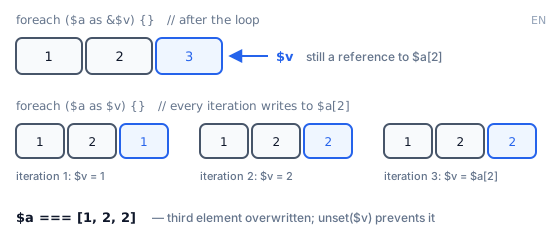
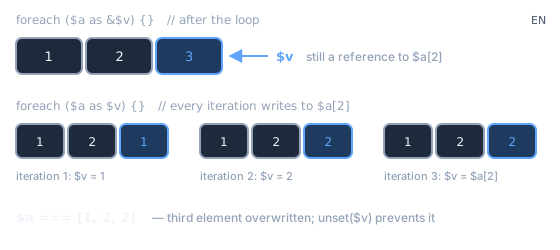
The second loop doesn’t create a new variable — it runs $v = $a[$i] on the existing $v, which is still
a reference to $a[2]. So every one of those assignments lands in $a[2]. Iteration by iteration:
| Second loop iteration | Written to $v (i.e. to $a[2]) |
$a after the iteration |
|---|---|---|
| 1 | $a[0] = 1 |
[1, 2, 1] |
| 2 | $a[1] = 2 |
[1, 2, 2] |
| 3 | $a[2] = 2 (copies itself) |
[1, 2, 2] |
That’s why the rule is unconditional: call unset() after every by-reference loop. Alternatively, avoid
references and use array_map(), as in the part on arrays.
switch versus match
Both constructs pick one of their branches based on the value you give them — in the examples below that’s
$code. PHP compares it with the branch values one by one and picks the first match. They differ in what happens
next: switch executes the statements in the branch (assignments, function calls, anything), while match
is an expression — each branch returns a single value, which you assign or return right away.
// switch — LOOSE comparison (==), falls through, executes statementsswitch ($code) {    case 200:    case 201:        $msg = 'OK';        break;          // forget it and execution falls through to default    default:        $msg = 'Unknown';}
// match (PHP 8) — STRICT comparison (===), an expression, no fall-through$msg = match ($code) {    200, 201 => 'OK',    404      => 'Not found',    default  => 'Unknown',};   // semicolon at the end — it's an expression, not a statement
switch |
match |
|
|---|---|---|
Comparing $code with the branch value |
== loose |
=== strict |
| Falls through to the next case | Yes — needs break |
No |
| Returns a value | No (statement) | Yes (expression) |
No match and no default |
Silently does nothing | Throws \UnhandledMatchError |
| Branch body | Multiple statements | A single expression only |
Two rows of this table make the biggest difference in practice. Strict comparison means that
match ('200') won’t hit the 200 branch — and that’s a good thing, because switch would silently match it.
No match throws an exception, so adding a new enum value without handling it in match shows up
immediately, not a month later.
match (true) instead of an elseif chain
$tier = match (true) { $points >= 1000 => 'gold', $points >= 100 => 'silver', default => 'bronze',};The branches are checked in order, and the first true one wins. It’s a more readable way of writing what would
otherwise be an if/elseif chain with a repeated assignment.
matchdoesn’t fully replaceswitch:switchcan execute multiple statements in a single branch, whilematchaccepts only a single expression. If you need several statements to produce the result, move them into a separate function or method and just call it frommatch:
$price = match ($customerType) { 'b2b' => calculateB2bPrice($order), // all the discount logic lives in the function default => $order->basePrice,};There’s one more difference worth knowing: switch and match evaluate their argument once, whereas an
if/elseif chain evaluates the condition separately in every branch. This matters when the argument is an
expensive call — for example, a function that queries the database.
include and require
A real project doesn’t fit in a single file. Configuration, helper functions and HTML templates live in separate
files, so you need a way to use code from one file in another. That’s what include and require are for: they
load the given PHP file and execute it at the point of the call, as if its contents were pasted right there. Both
do the same thing as long as the file exists — they differ in what happens when it doesn’t:
| When the file is missing | Use for | |
|---|---|---|
include |
A warning, the script carries on | Optional templates |
require |
Throws Error — if uncaught, stops the script |
Everything essential |
include_once / require_once |
As above, but make sure the file isn’t loaded twice | Legacy code; replaced by autoloading today |
require is the default choice. include only makes sense when a missing file is genuinely acceptable.
require __DIR__ . '/../config.php'; // __DIR__ makes the path independent of the working directoryA file can return something
This is a popular and readable way to load configuration in PHP — Laravel, for example, keeps its configuration this way:
<?php
return [    'db' => ['host' => 'localhost'],];
The file that needs the configuration simply assigns the result of require to a variable:
<?phpdeclare(strict_types=1);
$config = require __DIR__ . '/../config.php';
A return placed directly in the file — outside any function or class — stops executing that file, and the
returned value becomes the result of require. It works exactly the same with include. What both statements
return depending on the situation:
File with return |
File without return |
File missing | |
|---|---|---|---|
require |
the returned value | 1 |
throws Error — if uncaught, stops the script |
include |
the returned value | 1 |
a warning and false, the script carries on |
Capturing a template’s output
A template loaded with include prints its HTML immediately, straight to the browser. Sometimes, though, you want
it in a variable — to send it by email, save it to a file, or insert it into a larger layout:
ob_start(); // from now on, everything that would be printed goes into a bufferinclude __DIR__ . '/views/invoice.php'; // the template prints HTML — but into the buffer, not to the browser$html = ob_get_clean(); // take the buffer's contents as a string and stop bufferingThanks to output buffering, the HTML the template would normally send to the browser ends up in the $html
variable. Many simple PHP template engines are built on this mechanism.
Watch out for one thing: a loaded file sees all the variables from the place where it was loaded, and can change them. Take a file that sets a variable:
<?php$user = 'admin';and an index.php file that loads it while already having its own $user variable:
<?php$user = 'john';require __DIR__ . '/helpers.php';
echo $user;   // admin — nothing in index.php hints at this
In a small script that’s convenient; in a larger project it’s a trap: to understand where a variable’s value
came from, you have to look through every loaded file. That’s why it’s better for a file to hand data back with
return (like config.php above) rather than quietly setting variables.
In modern code you write require practically once — for vendor/autoload.php. Composer’s PSR-4 autoloading
takes care of the rest. I’ll cover Composer and autoloading in a separate series on advanced PHP.
What’s next
You now know operators, conditionals, loops and loading files. Time for functions, which let you reuse the same code many times.
In the next part: defining functions in PHP, parameter and return types, named and variadic arguments, passing by
reference, and then closures — function () use ($x), arrow functions, the f(...) syntax, and what callable
means in PHP.